Arabic Keyboard with Harakat (Tashkeel)
Type Arabic with full harakat (Tashkeel) — Fatha, Damma, Kasra, Shadda, Sukun and Tanween — directly in your browser. Click the on-screen letters, use your own keys, or write phonetically, then add the diacritics in one tap. Free, fast, and private, with no download.
Last updated: June 2026
Quick answer: To type Arabic with harakat, type the letter first, then tap the mark (Fatha َ, Damma ُ, Kasra ِ, Sukun ْ, Shadda ّ or a Tanween) in the yellow diacritics row of the keyboard above. The mark attaches to the letter you just typed; tap Copy to paste the vocalised text anywhere.
What Are Harakat & Tashkeel?
Harakat (حركات) are the small diacritic marks written above or below Arabic letters to show short vowels. Standard Arabic is usually written without them — fluent readers infer the vowels — but they are essential for learners, children’s books, names, and religious texts like the Quran where exact pronunciation matters.
Harakat vs tashkeel — the difference
Harakat strictly means the three short-vowel marks: Fatha (a), Damma (u) and Kasra (i). Tashkeel (تشكيل) is the whole system of marks — harakat plus Sukun, Shadda, the three Tanween, Madda and the dagger alif. In everyday use the two words are often used interchangeably.
3 Ways to Add Harakat With This Keyboard
This Arabic keyboard with harakat lets you place every mark in one tap. Pick whichever input you prefer:
- Click method: click the letter on the on-screen keyboard, then tap the mark in the yellow diacritics row.
- Physical keyboard: press the letter key, then hold Shift and the mapped key — Fatha = Shift+Q, Damma = Shift+E, Kasra = Shift+A (full list below).
- Type by sound: switch to Transliteration and write phonetically (salam → سلام), then add the marks from the diacritics row.
Build fully vocalised words by alternating letter and mark — type ك then Fatha, ت then Fatha, ب then Damma to write كَتَبُ. When you’re done, Copy it anywhere or tap Listen to hear it read aloud. Nothing is sent to a server.
The Full Arabic Tashkeel Reference Table
Every mark on the keyboard, what it sounds like, how to type it, and an example on the letter ب (b):
| Mark | Name | Sound | Shift key | Example |
|---|---|---|---|---|
| َ | Fatha (فتحة) | short “a” | Shift + Q | بَ = ba |
| ُ | Damma (ضمة) | short “u” | Shift + E | بُ = bu |
| ِ | Kasra (كسرة) | short “i” | Shift + A | بِ = bi |
| ْ | Sukun (سكون) | no vowel | Shift + X | بْ = b |
| ّ | Shadda (شدة) | doubled consonant | Shift + ` | بّ = bb |
| ً | Tanween Fath | “an” | Shift + W | بً = ban |
| ٌ | Tanween Damm | “un” | Shift + R | بٌ = bun |
| ٍ | Tanween Kasr | “in” | Shift + S | بٍ = bin |
| ٰ | Dagger Alif | long “aa” | — | هٰذا = haadha |
| ٓ | Madda | long “aa” on alif | — | آن = aan |
The three Tanween marks (double vowels) add an “-n” sound and usually sit on the final letter of an indefinite noun. Madda appears on alif (آ) for a long “aa”, and the dagger alif stands in for a missing long alif in words like هٰذا and اللّٰه.
Shadda + a Vowel (the part most guides skip)
Shadda doubles a consonant and is almost always combined with a vowel. The order matters — type the letter, then the shadda, then the vowel:
- د + shadda + Fatha → دَّ (“dda”) — as in مُدَّة (mudda, “a period”).
- ر + shadda + Kasra → رِّ — as in مُدَرِّس (mudarris, “teacher”).
- With Tanween: ب + shadda + Tanween Fath → بًّ.
On this keyboard, just tap them in that sequence and both marks stack correctly on the same letter.
One Word, Three Meanings — Why Harakat Matter
The same three consonants ك ت ب become different words depending only on the harakat:
| Vocalised | Reads as | Meaning |
|---|---|---|
| كَتَبَ | kataba | he wrote |
| كُتِبَ | kutiba | it was written |
| كِتاب | kitāb | a book |
Without the marks all three are written كتب — context tells a fluent reader which is meant, but harakat make it unambiguous. That’s exactly why learners and sacred texts use them.
When Do You Actually Need Harakat?
- Learning Arabic: full vocalisation shows you exactly how to pronounce each word while you build vocabulary.
- Quran & religious text: precise harakat are required for correct recitation (tajweed).
- Names & unfamiliar words: marks remove doubt when a reader can’t guess the vowels.
- Dictionaries & children’s books: where exact reading must be taught.
For everyday messages you usually don’t need them — but when you do, this keyboard makes them quick.
How to Type Harakat on Windows, Mac, iPhone & Android
- Windows & Mac: on the Arabic 101 / Arabic-PC layout, type the letter then hold Shift and the mapped key (Fatha = Shift+Q, Kasra = Shift+A, Damma = Shift+E). Full steps: Arabic keyboard for Windows and Arabic keyboard on Mac.
- iPhone: press and hold the tashkeel key just right of the spacebar and slide to the mark — see Arabic keyboard on iPhone.
- Android (Gboard): long-press a letter to reveal its diacritics, or switch to the Arabic layout’s symbols row.
- Any device, no setup: use the keyboard at the top of this page and tap the marks directly.
Automatic vs Manual Tashkeel
Some tools add diacritics to a whole sentence automatically (AI diacritization). They’re useful for a quick first pass, but they guess — and they often misplace marks on proper nouns, foreign words, or sentences that are genuinely ambiguous. For the Quran, names, or anything you’ll publish, place the harakat yourself so they’re exactly right. This keyboard is built for that precise, manual control.
Who uses Arabic harakat — and official references
Full tashkeel matters most for Quran study, classical Arabic and learners — from students across the Maghreb (Morocco, Algeria, Tunisia) and the Gulf to the diaspora in France and the US. The diacritic buttons above add every harakat with one tap.
Reference: Arabic diacritics. See also the Arabic Keyboard hub, how to type hamza and English to Arabic typing.
Harakat and search: the trap nobody warns about
This is the most expensive thing to learn late, and it applies to anything an Arabic keyboard with harakat produces. A word typed with harakat is a different string from the same word typed without them, and most search boxes compare strings.
كُتُب and كتب look like the same word to you and are four characters apart to a computer. Someone searching for the plain form may never reach your vowelled one. Google normalises this fairly well; site search boxes, databases, spreadsheets and form fields usually do not, so an Arabic keyboard with harakat needs using deliberately on anything that will be indexed.
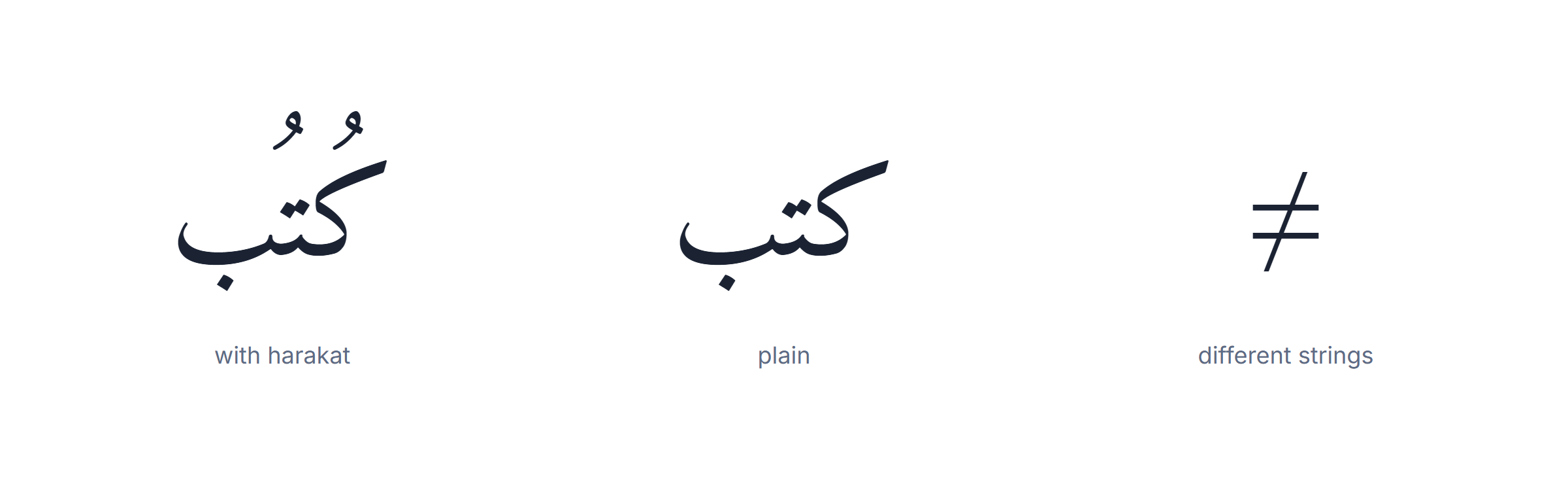
Where this bites in practice. A name entered with harakat into an official form will not match the same name entered without them. A product title with tashkeel will not surface for the plain query. A spreadsheet column mixing both will not group or sort correctly, and the duplicates are invisible on screen even though one Arabic keyboard with harakat produced both.
The rule that follows. Use the Arabic keyboard with harakat for text meant to be read aloud or learned from — teaching material, poetry, children’s books, a word whose meaning is genuinely ambiguous. Use the plain form for anything meant to be found: names, titles, form fields, product data, headings. Almost all published Arabic is written without harakat for exactly this reason, and that is a convention rather than laziness.
Two habits that save trouble. Store the plain form and add harakat only in the copy a human reads. And when you need both, keep them in separate fields rather than one — an Arabic keyboard with harakat makes producing the vowelled version easy, but only you can decide which version each field should hold.
If you inherit a document that mixes the two, the cheapest fix is to strip the marks from the searchable fields and leave the display text alone. Stripping is safe and reversible in a way that adding is not: removing harakat never changes which word it is, while adding the wrong one does. That asymmetry is the reason to reach for an Arabic keyboard with harakat late in a document rather than early.
Five mistakes people make with an Arabic keyboard with harakat
All five come from treating harakat as decoration rather than as spelling, and an Arabic keyboard with harakat makes every one of them effortless to commit.
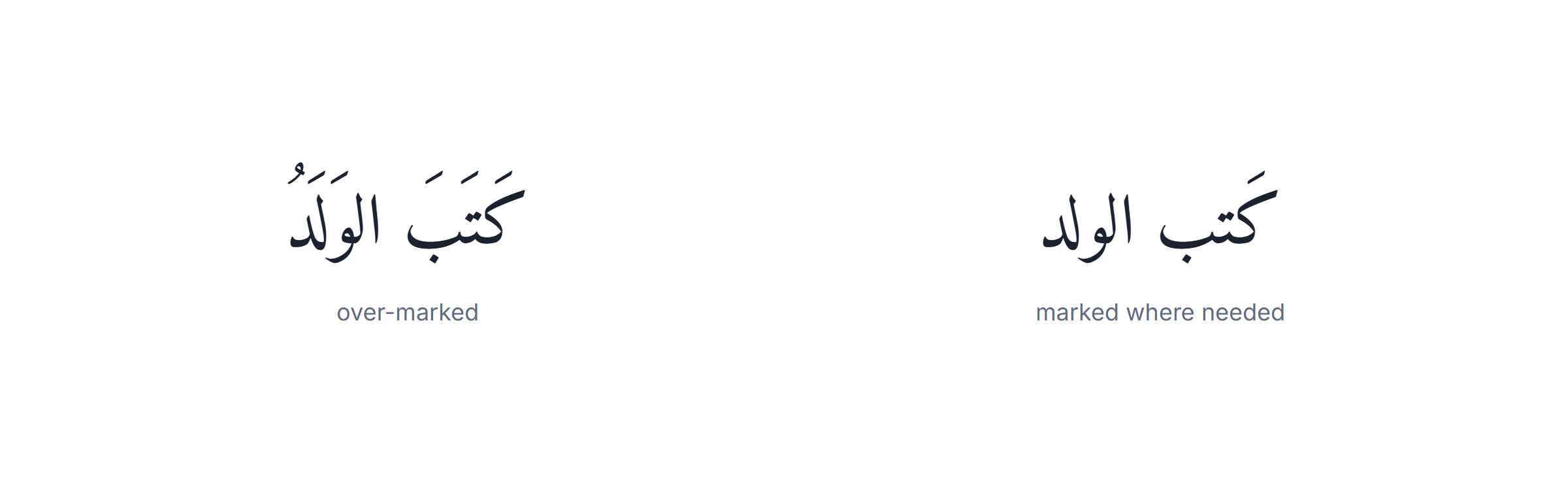
1. Marking every letter. Fully vowelled text is for the Quran, poetry and teaching material. In ordinary writing it reads as shouting — the equivalent of writing English in full phonetic notation. Mark the one word that is ambiguous and leave the rest alone. An Arabic keyboard with harakat makes it easy to mark everything, which is exactly why restraint has to be deliberate.
2. Putting the mark on the wrong letter. A haraka belongs to the consonant it follows, not the one it precedes. Getting this backwards produces a real word that means something else, and it looks completely normal on screen. No Arabic keyboard with harakat can catch it for you, because both versions are valid Arabic.
3. Ordering shadda and the vowel wrongly. When a letter carries both, shadda comes first and the vowel second in the character stream. Reverse them and many fonts render the marks stacked oddly or drop one. This is the single most common technical error with any Arabic keyboard with harakat.
4. Using harakat to fix a font problem. If letters are not joining, the font cannot draw Arabic — adding marks does not help and makes the mess harder to read. Change the font instead — no Arabic keyboard with harakat can repair a font that cannot draw the script.
5. Confusing tanwin with a doubled letter. The tanwin marks ً ٌ ٍ add an -n sound at the end of a word; shadda ّ doubles a consonant in the middle. They are unrelated, and swapping them changes the grammar rather than the pronunciation alone. An Arabic keyboard with harakat offers both sets side by side, which makes the mix-up easy and the fix easy too.
A sixth habit, not a mistake: proofread vowelled text aloud. Harakat exist to record sound, so the ear catches errors that the eye slides past — and it is the only check that works, because a wrongly vowelled word is still a valid word.
Quranic marks are a different system
If you are copying Quranic text, expect symbols that no ordinary Arabic keyboard with harakat produces, and do not try to reproduce them by hand.
Standard tashkeel — fatha, damma, kasra, sukun, shadda, the three tanwin — is the set used for all normal Arabic and the set this Arabic keyboard with harakat provides. Quranic orthography adds a second layer on top: waqf marks that tell a reciter where stopping is required, permitted or forbidden, plus small letters, elongation signs and regional variations between the reading traditions.
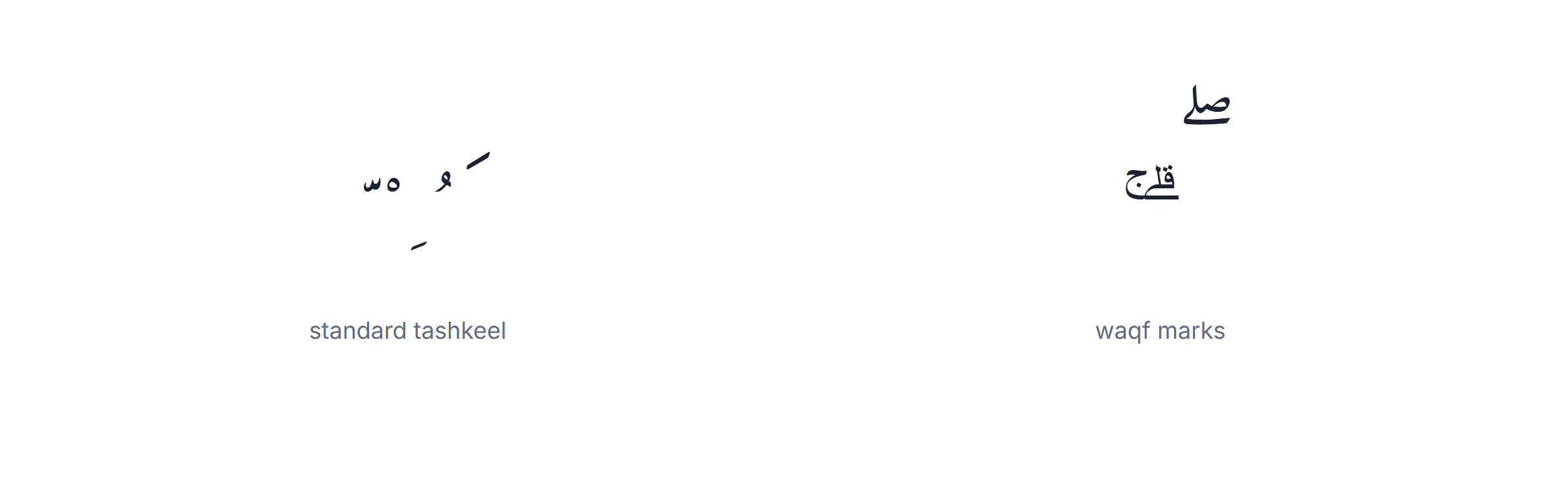
Those marks are not decoration and they are not optional flourishes — they encode recitation rules, and reproducing them incorrectly changes instructions rather than style. Copy Quranic text from a verified digital source such as an established mushaf project, rather than retyping it, however good your Arabic keyboard with harakat is.
Two practical notes. Fonts matter more here than anywhere else: use a dedicated Quranic face (KFGQPC Uthmanic, Amiri Quran) or the marks will stack badly or vanish, whatever produced them. And the text will not match a plain search for the same reason described above, only more so — Quranic text carries far more marks than ordinary vowelled Arabic, and far more than any Arabic keyboard with harakat emits.
For everything that is not Quranic — a poem, a name, a lesson, a children’s book, a word you want read correctly — the standard marks on this Arabic keyboard with harakat are the complete set, and nothing else is needed.
Learning to read without harakat — the goal, not the enemy
Every learner reaches the same crossroads: vowelled text is comfortable, real text has no vowels, and the gap between them feels enormous. An Arabic keyboard with harakat is the bridge, provided you use it as a bridge and not as a destination.
The reason unvowelled Arabic is readable at all is that Arabic words are built on three-consonant roots with predictable patterns. كتب carries the idea of writing, and the pattern tells a reader whether it is kataba (he wrote), kutub (books) or kitab (a book). Fluent readers are not guessing — they are recognising patterns, and the context settles the rest.
A routine that works, using an Arabic keyboard with harakat at each step. Stage one: type the words you already say, fully vowelled, and read them aloud. Stage two: type the same words with no marks at all and read them again — you already know the sound, so you are training the pattern, not decoding, and the Arabic keyboard with harakat is what lets you produce the pair. Stage three: take unfamiliar text and add harakat yourself, then check. That last step is the one that actually builds reading, because guessing wrong and being corrected teaches faster than being shown.
What to expect: reading simple unvowelled sentences within a few months, and being unsure about unfamiliar proper nouns forever. Native readers are unsure about those too — it is exactly why a name is one of the few things still written with harakat in otherwise plain text.
The failure mode to avoid is staying on fully vowelled text for years. It is comfortable, it feels like progress, and it does not transfer. An Arabic keyboard with harakat should be the thing you reach for when a word is genuinely ambiguous, not the default setting you never turn off.
One last practical use worth knowing. If you are preparing material for someone else — a student, a child, a colleague learning Arabic — an Arabic keyboard with harakat lets you produce both versions of the same text in seconds: the vowelled one to learn from, the plain one to practise on. Handing over both is far more useful than handing over either alone.
Frequently Asked Questions
How do I type Arabic with harakat?
Type the letter first, then tap the harakat (Fatha, Damma, Kasra, Sukun, Shadda, or a Tanween) in the diacritics row. The mark attaches to the letter you just typed.
What’s the difference between harakat and tashkeel?
Harakat are the three short-vowel marks (Fatha, Damma, Kasra). Tashkeel is the whole system, also including Sukun, Shadda, Tanween, Madda and the dagger alif.
What are the keyboard shortcuts for harakat?
On the Arabic 101 layout: Fatha = Shift+Q, Damma = Shift+E, Kasra = Shift+A, Sukun = Shift+X, Shadda = Shift+`, Tanween = Shift+W/R/S.
How do I type a shadda with a vowel?
Type the letter, then the shadda, then the vowel. The shadda doubles the consonant and the vowel stacks with it.
Can I add harakat automatically to a whole sentence?
Automatic tools exist but only guess and can misplace marks on names or ambiguous words. For the Quran or learning, place them yourself.
How do I type harakat on my phone?
On iPhone, hold the tashkeel key right of the spacebar and slide. On Android Gboard, long-press a letter. Or use this keyboard in your mobile browser.
Why do most Arabic texts not show harakat?
Fluent readers infer the vowels from context, so everyday Arabic is written without them; they appear in the Quran, dictionaries and learning material.
Can I copy the vocalised text?
Yes. Tap Copy and paste the fully-marked text into any app. Everything stays in your browser.