Chinese Keyboard Online
Type Chinese instantly with our free Chinese keyboard. Use Pinyin input — type the sound (like nihao) and pick the characters (你好) from the candidate bar — or click characters on the on-screen keyboard. No download, no sign-up.
Last updated: June 2026
Why Use Our Chinese Keyboard?
Our online Chinese keyboard lets you write Mandarin quickly without installing a Chinese input method on your device. It is built for students, teachers, travellers, and anyone who needs to type Chinese characters from any computer or phone. You type the sound of the word in Latin letters, and the tool turns it into real Chinese characters.
Unlike basic tools that only let you click characters one by one, this keyboard includes a true Pinyin engine with a candidate bar, so you can write full words and sentences naturally and fast.
How Pinyin Input Works
Pinyin is the official romanisation of Mandarin Chinese. With Pinyin input you simply type how a word sounds and then choose the correct character:
- Type the sound: for example nihao, xiexie, or zhongguo.
- Pick a candidate: the matching characters appear in the candidate bar — click one or press the number keys 1 to 9.
- Use space and backspace: press space to accept the first candidate, and backspace to correct the Pinyin before choosing.
Because Mandarin has many characters that share the same sound, the candidate bar is what makes typing Chinese possible. You can also switch to the on-screen mode to click common characters directly when you only need a few.
Tips for Typing Chinese Faster
The fastest way to type Mandarin is to write whole words instead of single characters. Type a complete word in Pinyin, such as pengyou for 朋友 or shijie for 世界, and choose it from the candidate bar with the number keys. The more letters you type, the fewer candidates appear, so full words are quicker than single syllables. When two words sound alike, glance at the candidate list before pressing space, and use backspace to fix the Pinyin before you commit a character.
If you are learning Mandarin, Pinyin input is also a study aid: it connects the sound of a word to its written form, which helps you remember both at once. Beginners can start with short, common words and build up to full sentences. You do not need to remember tone marks here — just type the base letters and pick the character you mean from the list.
Who Uses an Online Chinese Keyboard
This tool is used by students completing homework, teachers preparing lessons, travellers writing messages, professionals sending emails, and anyone who needs to write a few lines of Chinese on a device that has no Chinese input installed. Because everything runs in the browser, you can use it on a shared or public computer, a friend’s laptop, or your phone, and then copy your text into WhatsApp, WeChat, email, or a document. Your text is processed entirely in your browser — use Copy or Save before you leave, and it is never sent to a server.
Writing Chinese online should be simple, fast, and available everywhere. That is the goal of this tool: a clean, modern, mobile-first keyboard that turns the sound of a word into the right characters, with copy, save, translation, and text-to-speech built in, so you can focus on what you want to say rather than on how to type it.
How We Compare to Other Chinese Keyboards
Most online Chinese tools only show a grid of characters to click, with no real Pinyin engine, no voice, and a dated design. We built a faster, mobile-first keyboard that turns the sound of a word into the right characters.
| Feature | Our Chinese Keyboard | Typical online keyboards |
|---|---|---|
| Pinyin input with character candidates | Yes | Rarely |
| Number-key candidate selection | Yes | No |
| Text-to-speech (Mandarin) | Yes | No |
| One-click copy, save & translate | Yes | Limited |
| Dark mode & private typing | Yes | No |
| Mobile-first, modern design | Yes | Often dated |
Useful Chinese Resources
- Google Translate – Translate your Chinese text quickly.
- MDBG Dictionary – A trusted Chinese-English dictionary.
Simplified or Traditional: which one you are typing
Before anything else, know which script you need, because the same word is written two ways and the wrong one marks you as writing for the wrong audience.
Simplified is standard in mainland China and Singapore. Traditional is standard in Taiwan, Hong Kong and Macau, and is what most overseas communities used before the 1950s. The Chinese keyboard on this page produces Simplified by default, which is the right default for most readers.
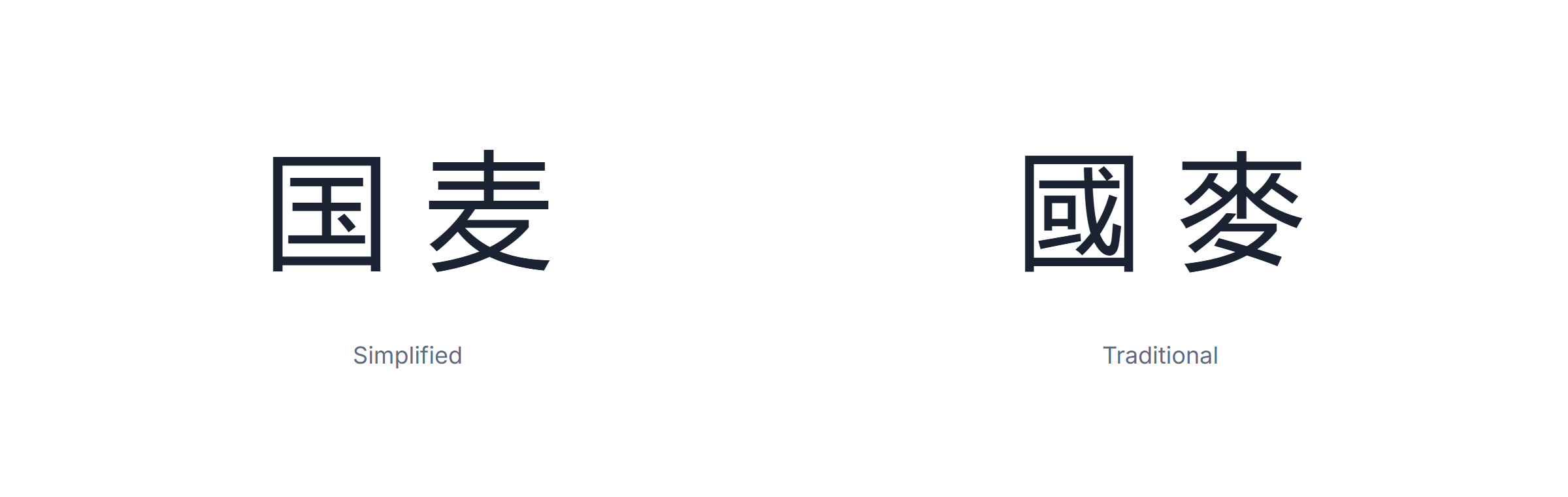
The difference is not cosmetic. Simplified cut the stroke count of about 2,000 common characters, so 麦 replaced 麥 and 国 replaced 國. Most characters were never changed at all, which is why a page can look almost identical in both.
Two traps worth knowing. Some simplifications merged distinct characters: 后 now covers both “after” and “queen”, which were separate in Traditional. Converting Simplified back to Traditional automatically therefore guesses, and sometimes guesses wrong. And Japanese uses a third set: kanji overlap with both but are not identical, so a Chinese keyboard is not a Japanese one.
If you are writing to a specific person, copy the script they use. If you are publishing, pick one and stay consistent — mixing the two inside a document is the one thing that reads as careless to every Chinese reader regardless of where they are from.
Tones, and why the Chinese keyboard does not ask for them
Mandarin has four tones plus a neutral one, and they change meaning completely: mā is mother, mǎ is horse, mà is to scold. Learners reasonably expect to have to type them. You do not.
Pinyin input on this Chinese keyboard ignores tone marks on purpose. You type ma and the candidate list shows every character that could be, ordered by how common it is. Choosing from the list is faster than typing a tone number, which is why essentially every real input method works this way.
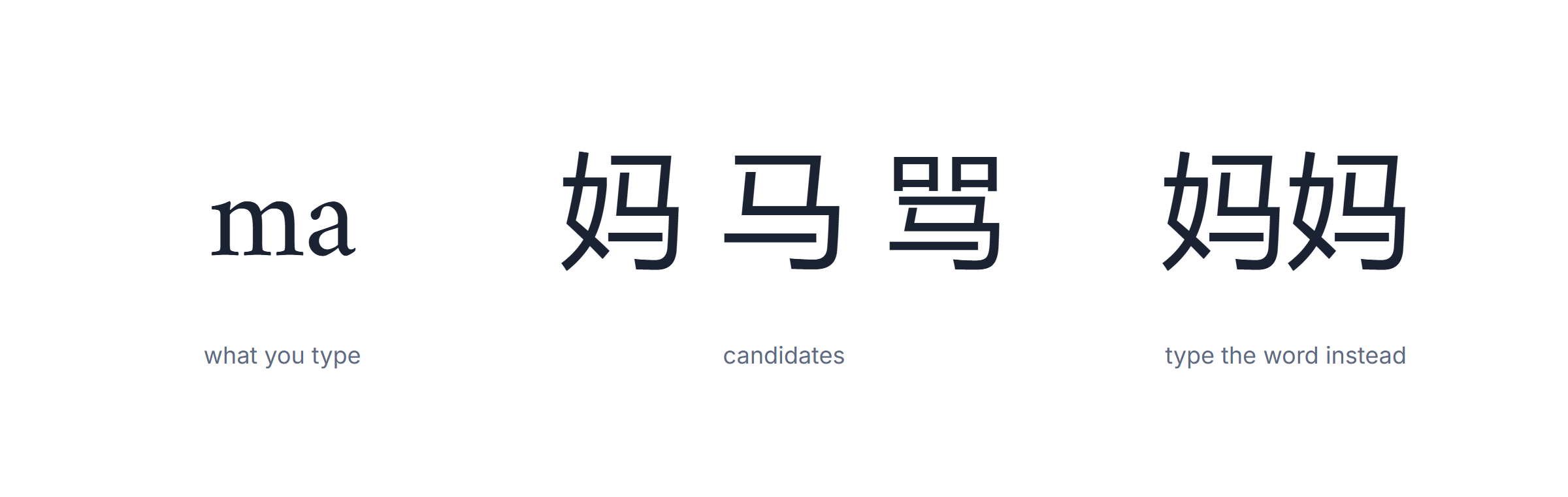
Type whole words, not single syllables. This is the single biggest speed gain available. Typing ma gives you dozens of candidates; typing mama gives you 妈妈 as the first hit. The longer the string, the less ambiguity there is to resolve.
Tone marks still matter for writing pinyin itself. If you are producing a textbook, a dictionary entry or a language exercise, the marks belong there — but that is Latin text with diacritics, not Chinese input, and you write it the way you would write any accented language.
One honest limit: because the Chinese keyboard cannot hear you, it cannot fix a wrong tone in your head. Picking the correct character from the list is the check. If you cannot tell which one is right, the ambiguity is in the Chinese, not in the tool.
Pinyin, Wubi, Zhuyin and handwriting — the four input families
Pinyin is what this Chinese keyboard uses and what most people use, but it is not the only way, and knowing the alternatives explains why Chinese input feels the way it does.
Pinyin maps sound to Latin letters. Its advantage is that you already know the alphabet; its cost is the candidate list, because many characters share a sound. Roughly the whole mainland uses it.
Zhuyin, also called Bopomofo, does the same job with its own 37 symbols rather than Latin letters. It is standard in Taiwan and is taught in primary school there, so a Taiwanese typist usually finds it faster than pinyin.

Wubi ignores sound entirely and codes each character by its strokes and components. It is much harder to learn and much faster once learned — there is almost no candidate list, because the code is nearly unique. Professional typists and court reporters use it.
Handwriting and voice are the two that need no learning at all. Handwriting suits anyone who can recognise a character but not recall its pronunciation, which is a common situation for heritage speakers.
The practical takeaway: if you are learning Chinese, stay on pinyin. It reinforces pronunciation every time you type, and the Chinese keyboard here needs nothing installed. If you are already fluent and typing all day, Wubi is the only one of these that will meaningfully beat it.
Fonts and encoding: why Chinese text sometimes shows as boxes
Two different failures look identical on screen, and telling them apart takes ten seconds once you know what to look for.
Empty boxes (tofu) mean the font has no glyph for that character. The text is fine; the font cannot draw it. Switch to Noto Sans SC, Noto Serif SC, Source Han Sans, or on Windows Microsoft YaHei and SimSun, all of which cover the common range.
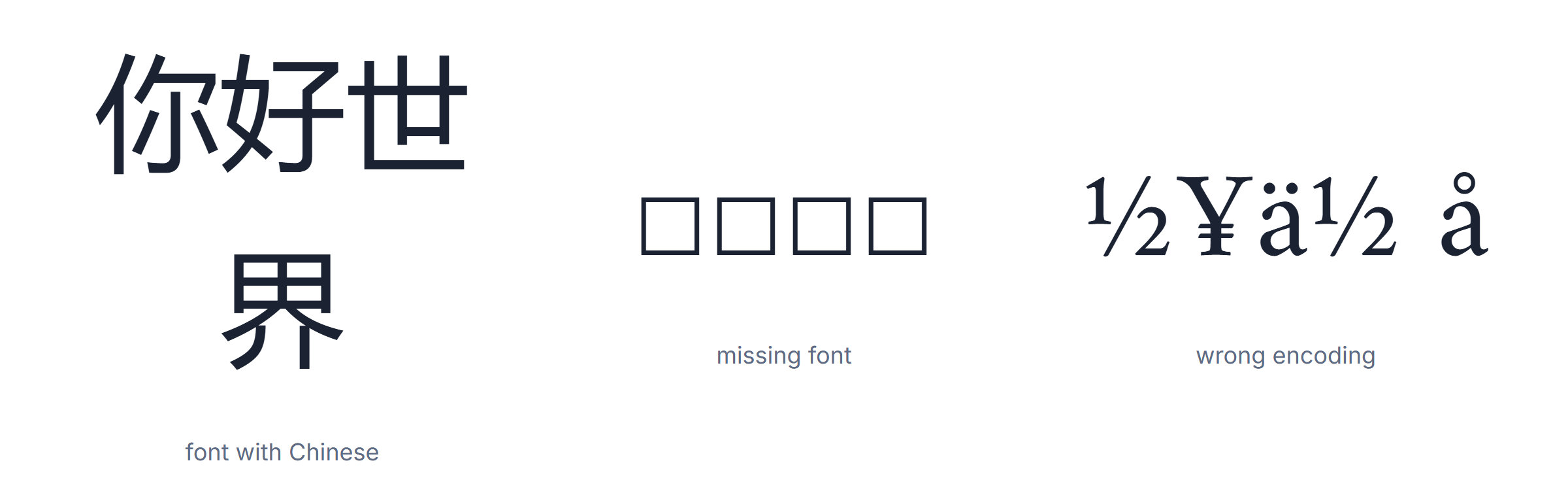
Random Latin and symbol soup (mojibake) means the bytes are being read with the wrong encoding — usually a file saved as GB2312 or Big5 and opened as UTF-8, or the reverse. This is a real data problem, not a display one, and the fix is to reopen the file specifying the right encoding, not to change the font.
Anything produced by the Chinese keyboard on this page is UTF-8, which every modern browser, phone and word processor handles. Mojibake normally shows up only with legacy files, older Windows software, or a CSV opened in a spreadsheet that guessed.
Two smaller points. Chinese is written without spaces between words, so a line breaks anywhere and that is correct. And Chinese has its own full-width punctuation — ,, 。, 、 — which occupies a full character cell. Using the Latin comma and period in Chinese text is the typographic equivalent of an accent error: understood, and visibly foreign.
Using a Chinese keyboard to learn characters faster
This is the use nobody advertises and it is worth more than the typing. A pinyin Chinese keyboard makes you do two things on every single word: recall the pronunciation, then recognise the character among lookalikes. That is a flashcard you did not have to make, repeated hundreds of times a day.
Reading and writing Chinese are famously separate skills. You can recognise two thousand characters and still be unable to produce one from memory with a pen, because recognition and recall are different operations. Typing sits neatly between them: it demands recall of the sound and recognition of the shape, which is exactly the pair most learners are missing.

Type whole words from day one. Single syllables produce huge candidate lists and teach you nothing but scrolling. Two-character words resolve almost immediately, and two-character words are how Mandarin actually works — most modern vocabulary is compounds, not lone characters.
Read the candidate list instead of taking the first hit. The lookalikes in that list are precisely the characters you will confuse later. Ten seconds spent noticing that 在 and 再 both appear under zai is worth more than ten minutes of a chart.
Then go backwards. Find short Chinese text — a caption, a comment, a headline — and type into the Chinese keyboard what you think it says. If your output matches the original, you read it correctly. If it does not, the difference points at the exact character you misread. This is the step that converts passive recognition into something you can use.
The one failure mode to avoid: staying on single syllables and always taking candidate number one. Do that for months and the Chinese keyboard becomes a machine that types for you rather than a tool that teaches you. The difference is entirely in whether you look at the list.
If you already read comfortably, none of this applies — use the Chinese keyboard purely for speed, and skip the learning angle.
One measurement worth doing once a month: pick a paragraph you typed four weeks ago and retype it. If the candidate lists resolve faster and you take the first hit more often because it is right rather than out of habit, you are genuinely reading better. That is a more honest signal than any character count, and it costs five minutes.
Finally, a note on handwriting input, since learners often ask. Switching to handwriting when a character will not come to you feels like cheating and is not — it is the fastest way to look something up when you know the shape and not the sound. Use it as a dictionary, then type the same word with the Chinese keyboard immediately afterwards so the pronunciation gets attached to it.
A closing caution about the candidate list, because it is the one place a Chinese keyboard can quietly teach you something wrong. The list is ordered by frequency across a huge corpus, not by what fits your sentence. For common words the first hit is almost always right; for names, technical terms and anything regional it often is not. When the word matters, read past the first candidate.
None of this requires installing anything. The Chinese keyboard on this page runs in the browser, works on a borrowed machine, and produces plain UTF-8 you can paste anywhere — which is the whole reason to keep it in a tab rather than replacing your system input method with it.
Frequently Asked Questions
How do I type Chinese with this keyboard?
Type the Pinyin sound of a word, then pick the Chinese characters from the candidate bar by clicking them or pressing the number keys. Press space for the first candidate.
What is Pinyin input?
Pinyin is the romanisation of Mandarin. You type how the word sounds (nihao, xiexie) and the keyboard suggests the matching characters (你好, 谢谢).
Do I need to install anything?
No. It runs in your browser on PC, Mac, iPhone and Android, with no installation or sign-up.
Can I listen to the Chinese text?
Yes. The Listen button reads your Chinese text aloud in Mandarin when a Chinese voice is available in your browser.
Have a question or suggestion? Contact us or read our privacy policy.