Arabic Keyboard Layout: Every Key, Both Layers, Explained
Every Arabic letter on your keyboard sits in a position somebody chose in the 1950s, for a machine with metal type bars. The Arabic keyboard layout you are using today is that decision, carried forward unchanged. This page maps it key by key, both layers, and gives you a board you can click without installing anything.
What the Arabic keyboard layout actually is
An Arabic keyboard layout is a mapping, nothing more: it says which Arabic character your operating system should produce when a given physical key is pressed. The plastic is irrelevant. A keyboard with English letters printed on it produces Arabic the moment the layout is active, which is why so many people in the Arab world type on unlabelled boards and why an on-screen Arabic keyboard works at all.
Three things follow from that, and they explain most of the confusion:
- The letters printed on your keys and the letters your keys produce are two different systems that happen to agree on an English machine.
- Switching layout is instant and reversible; it changes no files and no settings.
- Nothing about the Arabic keyboard layout is stored in the document you type — the text is plain Unicode, identical whatever layout produced it.

The interactive board: click any key
This is the standard Arabic keyboard layout, live. Click a key and the letter goes into the box. Toggle the shift layer to see where the vowel marks hide.
- Click a key to insert it.
- Shift layer reveals the harakat and the alternative forms.
- Copy puts real Unicode Arabic on your clipboard.
- Nothing is uploaded; the text never leaves your browser.
Every key of the Arabic keyboard layout, mapped
The full Arabic keyboard layout, as Windows, macOS and Linux install it. The fourth column is what the same key gives you with shift held.
| QWERTY key | Arabic letter | Name | Shift layer |
|---|---|---|---|
q | ض | dad | َ |
w | ص | sad | ً |
e | ث | thaa | ُ |
r | ق | qaf | ٌ |
t | ف | faa | ﻹ |
y | غ | ghain | إ |
u | ع | ain | ‘ |
i | ه | haa | ÷ |
o | خ | khaa | × |
p | ح | haa (hard) | ؛ |
[ | ج | jeem | < |
] | د | dal | > |
a | ش | sheen | ِ |
s | س | seen | ٍ |
d | ي | yaa | ] |
f | ب | baa | [ |
g | ل | lam | ﻷ |
h | ا | alef | أ |
j | ت | taa | ـ |
k | ن | noon | ، |
l | م | meem | / |
; | ك | kaf | : |
' | ط | taa (heavy) | “ |
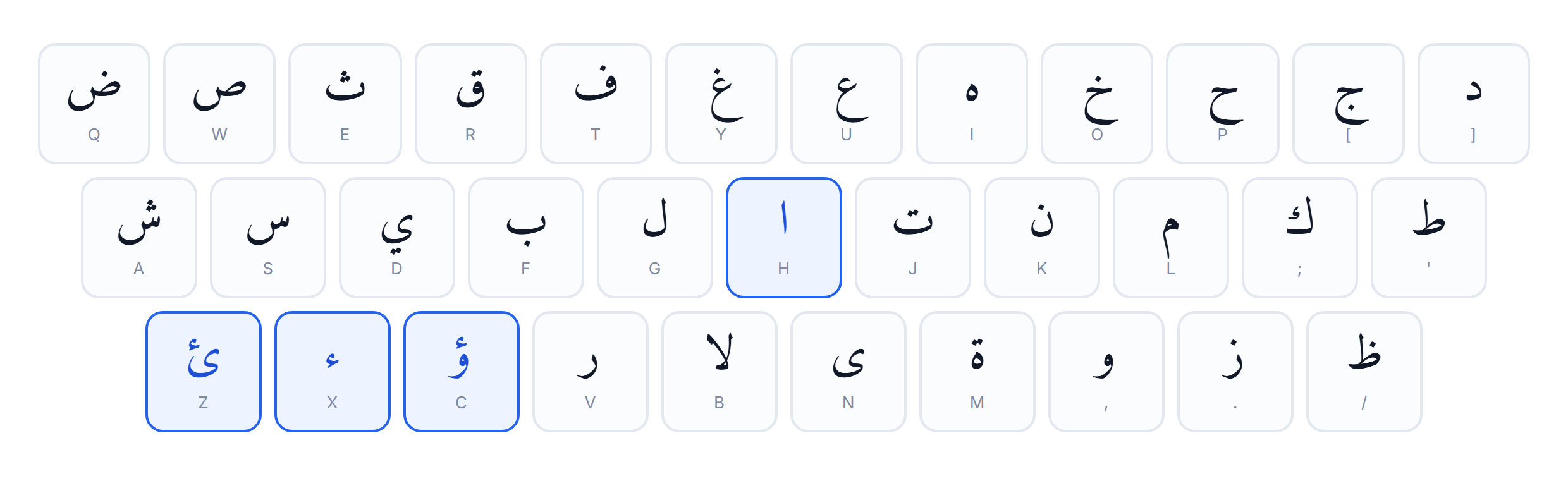
z | ئ | hamza on yaa | ~ |
x | ء | hamza | ْ |
c | ؤ | hamza on waw | } |
v | ر | raa | { |
b | لا | lam-alef | ﻵ |
n | ى | alef maksura | آ |
m | ة | taa marbuta | ’ |
, | و | waw | , |
. | ز | zay | . |
/ | ظ | zaa | ؟ |

How to read the Arabic keyboard layout map
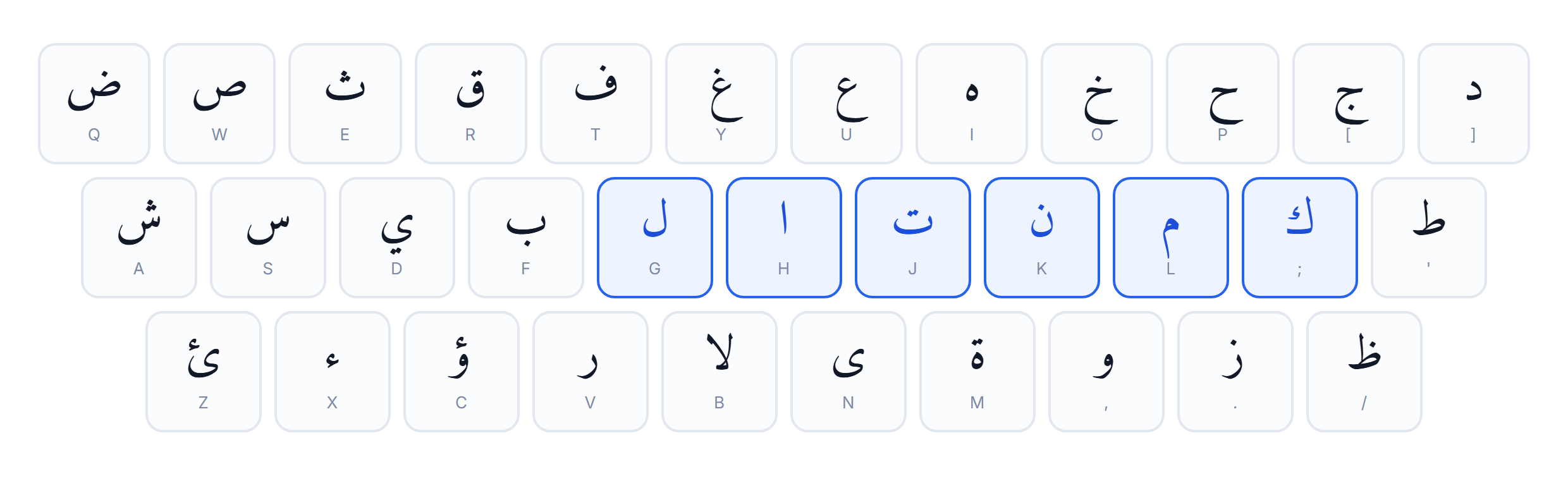
- Home row, right hand: ا ت ن م ك — the five most frequent letters in Arabic sit under your strongest fingers.
- The لا ligature has its own key (
b) because it is one glyph in print, not two. - Punctuation is mirrored: the Arabic comma ، and question mark ؟ face the other way and live on the shift layer.
Why the letters sit where they sit
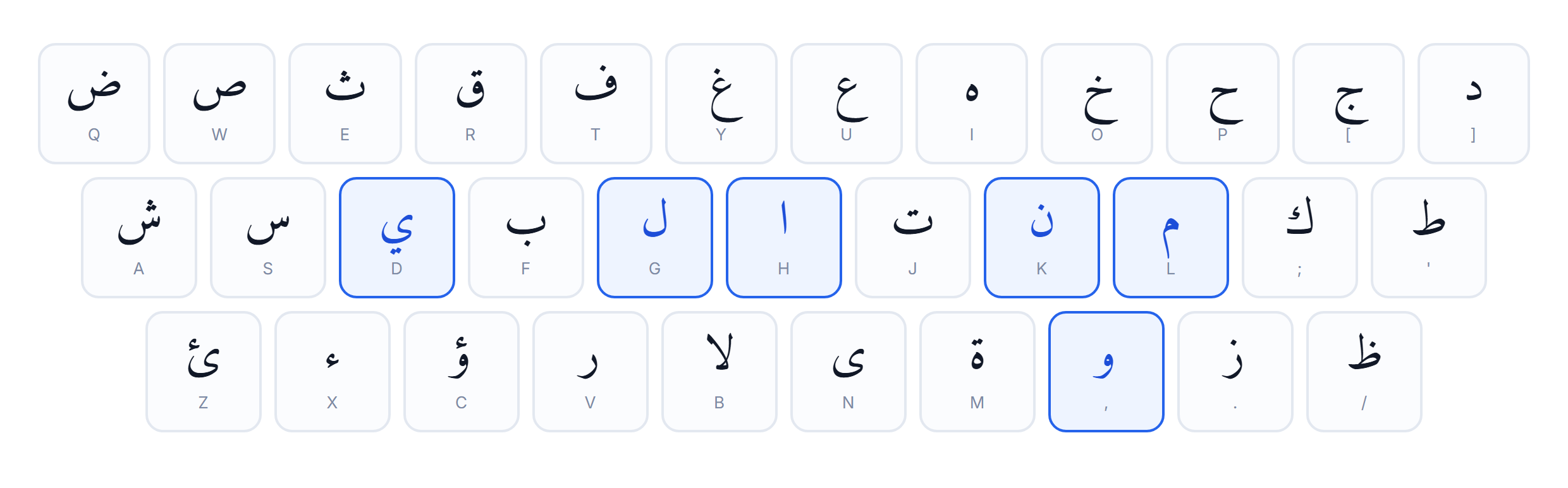
The Arabic keyboard layout is not alphabetical and it is not random. It is a frequency layout, designed for mechanical typewriters, and the design goal was the same one QWERTY solved for English: keep frequent letters apart so the type bars do not collide, and keep them close so the hands do not travel.
- ا (alef), the most common letter in Arabic, is on the home row under the index finger.
- ل (lam) and م (meem) flank it.
- The rare emphatics ظ ط ض ص are pushed to the edges.
- The hamza family — ء ئ ؤ — is grouped on the bottom-left, because they behave as one problem, not three.
Once you know that, the map stops looking arbitrary. It is a frequency table wearing a keyboard. The same logic is why Arabic is written right to left and the layout still reads left to right: the keys are hardware, the direction is text.
The shift layer, where the harakat live
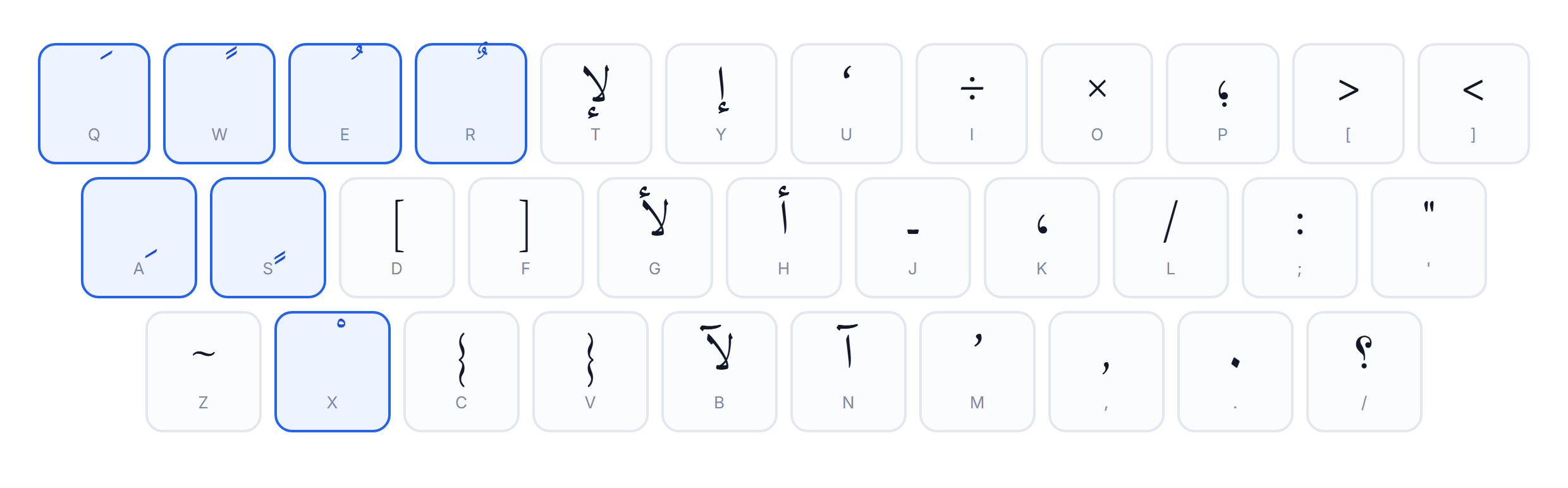
Most people never find the harakat because nothing on the physical key suggests them. On the standard Arabic keyboard layout they are all on shift.

| Keys | Mark | Name | What it does |
|---|---|---|---|
Shift + Q | َ | fatha | short a |
Shift + A | ِ | kasra | short i |
Shift + E | ُ | damma | short u |
Shift + W | ً | tanween fath | -an ending |
Shift + S | ٍ | tanween kasr | -in ending |
Shift + R | ٌ | tanween damm | -un ending |
Shift + X | ْ | sukun | no vowel |
Shift + ~ | ّ | shadda | doubles the letter |
When you actually need them
- Qur’anic and liturgical text: always.
- Children’s books and learner material: usually.
- Poetry, where the metre depends on the vowels: often.
- News, chat, business writing: almost never.
If you need them constantly, our harakat keyboard puts every mark on a visible button instead, and the guide to the marks explains what each one does.
Additional characters most people cannot find
Beyond the 28 letters, the Arabic keyboard layout carries a set of additional forms that are not optional — they are ordinary spelling, and leaving them out is a mistake, not a shortcut.
- Hamza ء on
x, and its seated forms أ إ ؤ ئ acrossh,y,candz. Getting the seat wrong changes the word — the hamza guide is the fastest fix. - Taa marbuta ة on
m. Feminine endings need it; typing ه instead is the single most common beginner error. - Alef maksura ى on
n, the dotless ya that ends words like على. - Alef madda آ on shift +
n. - Tatweel ـ on shift +
j, the stretching character used for justification. Never use it for emphasis in body text. - Lam-alef لا on
b, with its hamza variants on shift.


Additional punctuation that is genuinely different
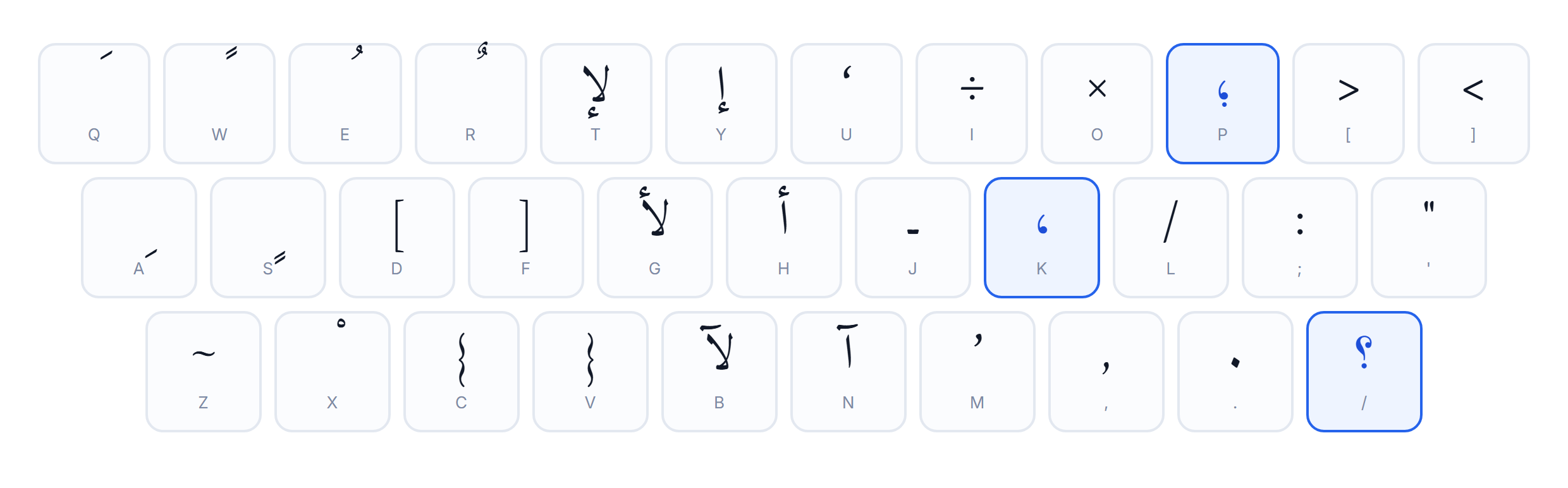
- Arabic comma ، — shift +
k. - Arabic semicolon ؛ — shift +
p. - Arabic question mark ؟ — shift +
/. - The full stop is not mirrored; it is the same character you already use. The punctuation guide covers why.
The other Arabic keyboard layouts
“The” Arabic keyboard layout is really a small family. They agree on the letters and disagree at the edges.
| Layout | Where you meet it | What it is | What changes |
|---|---|---|---|
| Arabic 101 | Windows, macOS, Linux, Android | The default everywhere. 33 letter keys on a US-shaped board. | Nothing to install on a modern OS — it is already in the language list. |
| Arabic 102 | Windows, some Linux desktops | Adds the extra key next to the left shift that European boards have. | Only useful on a 102-key physical board; the letters are otherwise identical. |
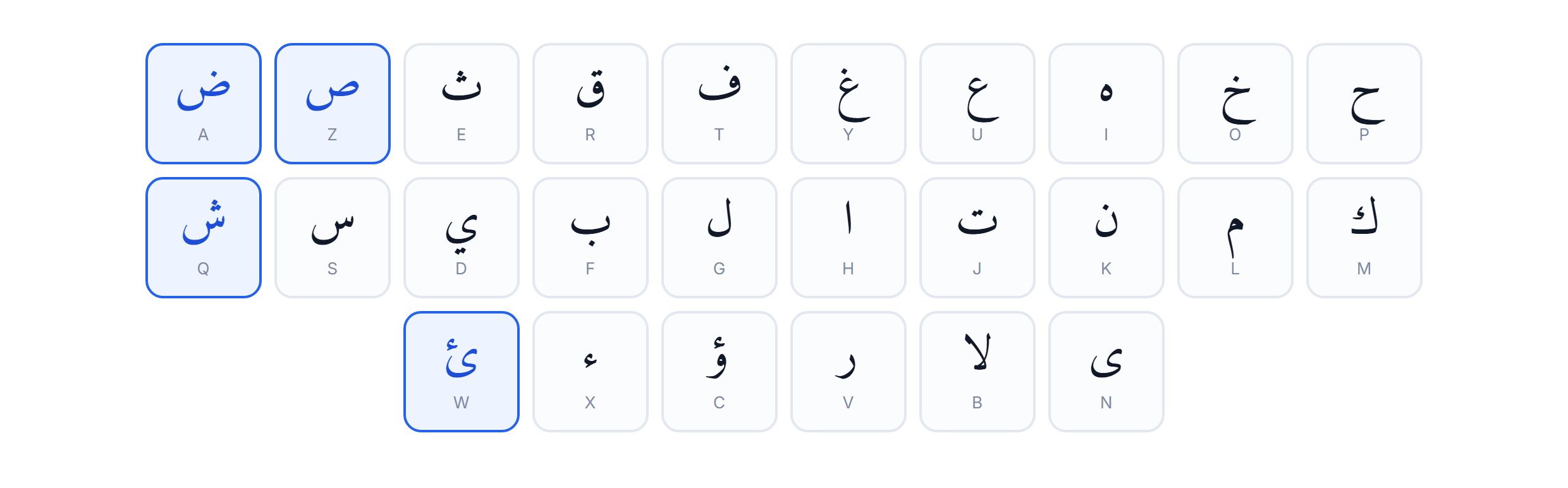
| Arabic AZERTY | France, Belgium, and most of the Maghreb | Same Arabic letters, but built for a French physical keyboard. | Q/A and W/Z swap, and the punctuation row moves. |
| Arabic phonetic | third-party tools and some Linux packages | Maps each Arabic letter to the Latin letter that sounds like it: s to س, k to ك. | Far faster to learn, far slower once you are fluent. Not a standard. |
Which Arabic keyboard layout you are probably on
- Bought your machine in Europe or North Africa? Likely an AZERTY body with Arabic 101 letters — see clavier arabe AZERTY.
- Bought it in the Gulf or Egypt? Arabic 101 on a US body, printed.
- Installed it yourself on any modern OS? Arabic 101, unless you chose otherwise.
- Using a phonetic tool? That is not a system layout at all — it is software mapping sounds, like our English to Arabic typing.
The Arabic keyboard layout on Mac, Windows and Linux
The Arabic keyboard layout is stable across operating systems. Everything else moves.
Windows
- Switch with Win + Space or Alt + Shift.
- The third layer is AltGr.
- Full walkthrough: Arabic keyboard for Windows.
macOS
- Switch with Ctrl + Space or the menu-bar flag.
- The third layer is Option, and several punctuation marks sit elsewhere than on Windows.
- Full walkthrough: Arabic keyboard on Mac.
Linux, Android, iPhone, ChromeOS
- Linux ships the same map through XKeyboardConfig — Arabic keyboard for Linux.
- Android and iOS use a touch layout with the same letter order — Android, iPhone.
- ChromeOS is a two-click add — Chromebook.
Learning the Arabic keyboard layout
The Arabic keyboard layout is 33 positions. That is a fortnight of ten-minute sessions, not a project.
- Week one — home row only, eight letters, no speed target.
- Week two — add the top row, then the bottom.
- Week three — shift layer, only if you need harakat.
- Measure, do not guess: the typing test gives you words per minute and accuracy on the same layout.
Stickers, blank boards, or on-screen
- Stickers — cheapest, and they peel.
- Printed Arabic keyboard — best if you type Arabic daily.
- On-screen — best if you type Arabic occasionally, on machines you do not own, or on a locked-down work computer where you cannot add a language.
Five mistakes the Arabic keyboard layout causes
- Typing ه where ة belongs.
- Typing ي where ى belongs at word end.
- Bare ا where a seated hamza is required.
- Latin punctuation inside Arabic text, which breaks the bidi algorithm and scrambles the line.
- Tatweel used as emphasis — it is justification, not styling.
Where the Arabic keyboard layout came from
Mechanical Arabic typewriters had a problem Latin ones did not: Arabic letters change shape depending on position, so a naive machine would need four type bars per letter. The industry solved it by cutting the shapes down to a workable set and standardising the positions around letter frequency. When computers arrived, the positions were already muscle memory for a generation of typists, so they were kept. The Arabic keyboard layout you use is a compatibility decision with a machine almost nobody alive has used.
Sources and further reading
Everything above can be checked. These are the primary references:
- Microsoft — Arabic 101 keyboard reference
- kbdlayout.info — KBDA1 scancode map
- Wikipedia — Arabic keyboard
- Unicode — Arabic code chart (U+0600)
- Unicode — UAX #9, the bidirectional algorithm
- Apple — change the keyboard layout on a Mac
- Microsoft — manage language settings in Windows
- ISO/IEC 9995 — keyboard layout standard
- freedesktop — XKeyboardConfig
- MDN — KeyboardEvent.key
- W3C — the dir attribute
- ScriptSource — the Arabic script
Frequently asked questions
What is the standard Arabic keyboard layout?
Arabic 101. It is the layout Windows, macOS, Linux and Android all install by default, and it is the one printed on physical Arabic keyboards sold in the Middle East and North Africa. Arabic 102 adds a single extra key for European-shaped boards, and an AZERTY variant exists for French hardware, but the letter positions in the standard Arabic keyboard layout are the same in all three.
Why does the Arabic keyboard layout look random?
It is not random, it is inherited. The positions come from mechanical Arabic typewriters, where the most frequent letters were placed where the strongest fingers fall and where the type bars would not jam. The layout was standardised long before computers and was carried over unchanged, exactly as QWERTY was.
Do I need an Arabic keyboard to type Arabic?
No. You can add the layout in your operating system and type on a blank board, put stickers on your existing keys, or use an on-screen Arabic keyboard like this one, which needs no install and no permissions.
Where are the harakat on the Arabic keyboard layout?
On the shift layer. Shift + Q gives fatha, Shift + A gives kasra, Shift + E gives damma, Shift + W and Shift + S give the tanween forms, and Shift + X gives sukun. Shadda sits on the same layer. Our harakat keyboard exposes them as buttons if you would rather not memorise the shift positions.
Is the Arabic keyboard layout the same on Mac and Windows?
The letters are. The punctuation and the symbol keys are not: macOS puts several marks in different places and uses Option rather than AltGr for the third layer. If you move between the two, the letters will feel identical and the brackets and quotes will not.
Can I learn the Arabic keyboard layout without buying a keyboard?
Yes, and most people do. Type on screen until the positions are automatic, then switch to a blank physical board. Our typing test measures the same thing a physical keyboard would.
Related tools and guides
The rest of the site, in one place:
- Arabic keyboard
- clavier arabe
- Arabic keyboard with harakat
- Arabic typing test
- English to Arabic typing
- Franco Arabic typing
- Arabic transliteration
- Arabic keyboard for Windows
- Arabic keyboard on Mac
- Arabic keyboard for Linux
- Arabic keyboard for Android
- Arabic keyboard on iPhone
- Arabic keyboard for Chromebook
- Arabic keyboard widget
- type Arabic in Word
- type Arabic in Google Docs
- type Arabic on WhatsApp
- type hamza
- Arabic letters
- Arabic harakat
- Arabic alphabet pronunciation
- Arabic numbers
- Arabic punctuation
- Arabic fonts
- Arabic calligraphy styles
- Arabic calligraphy generator
- Arabic grammar rules
- why Arabic is written right to left
- how to learn Arabic
- is Arabic hard to learn
- common Arabic phrases
- Arabic greetings
- Arabic quotes
- beautiful Arabic words
- Arabic slang
- Arabic dialects
- Arabic vs Persian
- Arabic vs Urdu
- clavier arabe AZERTY
- clavier arabe Maroc
- clavier arabe Algérie
- clavier arabe Tunisie
- clavier arabe phonétique
- clavier arabe iPhone
- clavier arabe WhatsApp
- clavier darija
- écrire son nom en arabe
- arabische Tastatur
- arapça klavye
- Chinese keyboard
- how a keyboard works
- quietest keyboard switches
- keyboard covers on a MacBook Air
- what keyboard Peterbot uses
- all our tools
- the blog
- the Persian alphabet
- font support
- the vowel marks
- measure your speed